Platform Updates: September 2026
Introducing Mosaic Intelligence
1 - Agentic Model Creation
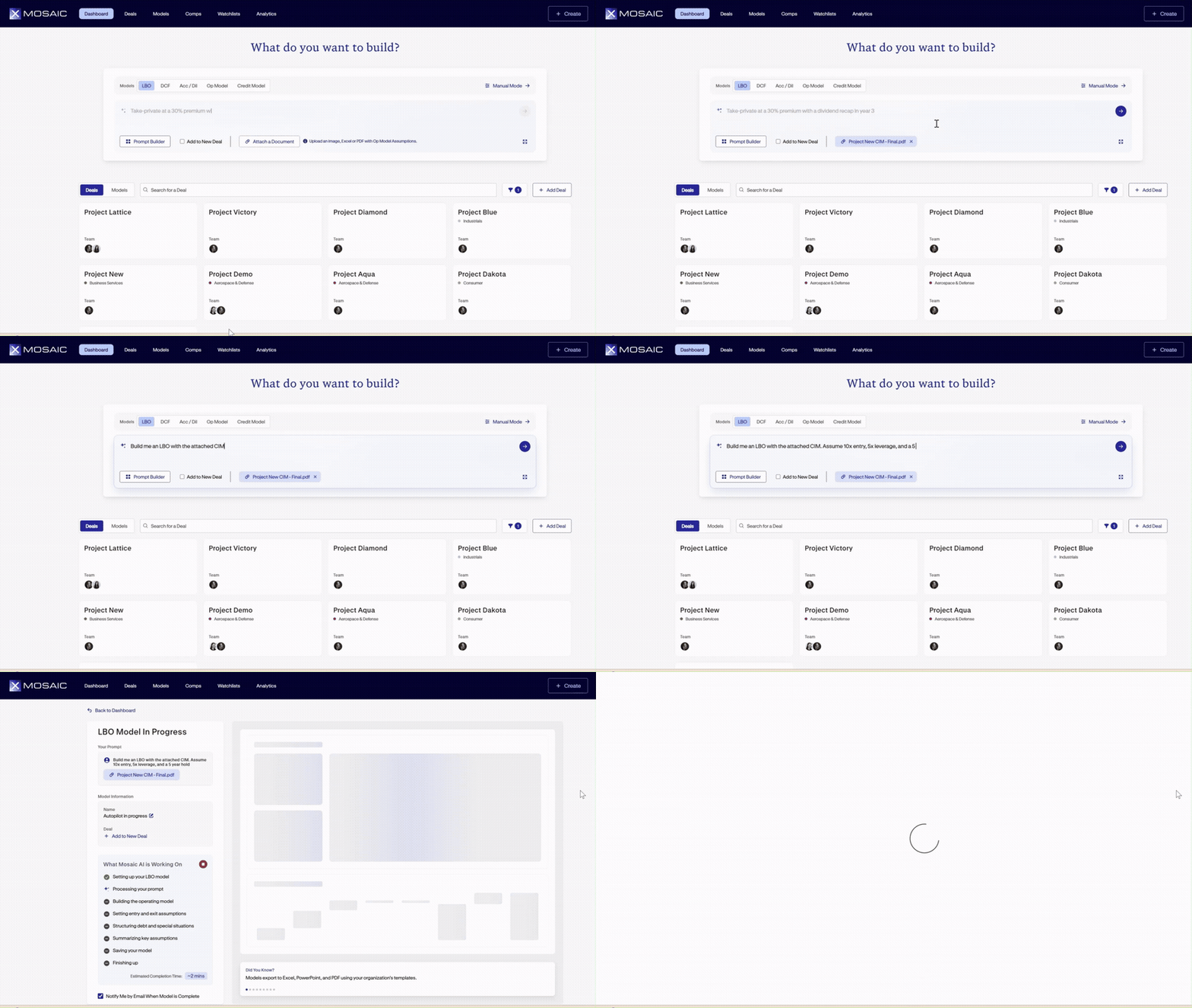
Mosaic's agentic workflow is now accessible directly from the homepage, allowing teams to build complete financial models using natural language prompts and supporting documents. Rather than manually selecting assumptions at each step of the model-building process, simply describe the desired analysis, attach relevant files, and let Mosaic AI handle the model creation process.
Simply describe the model you'd like to build, such as:
“Build an LBO model from the attached CIM, assuming a 10x entry multiple, 5x leverage priced at S+550, and a more conservative base case.”
Mosaic AI can read Excel workbooks, PDFs, and screenshots, including multi-tab spreadsheets and multi-page documents, to identify relevant historical financials, forecasts, and transaction assumptions. Using this information, Mosaic AI constructs the full model, from the operating forecast and P&L through the debt schedule and investment returns.
Customizable Assumptions and Profile Defaults
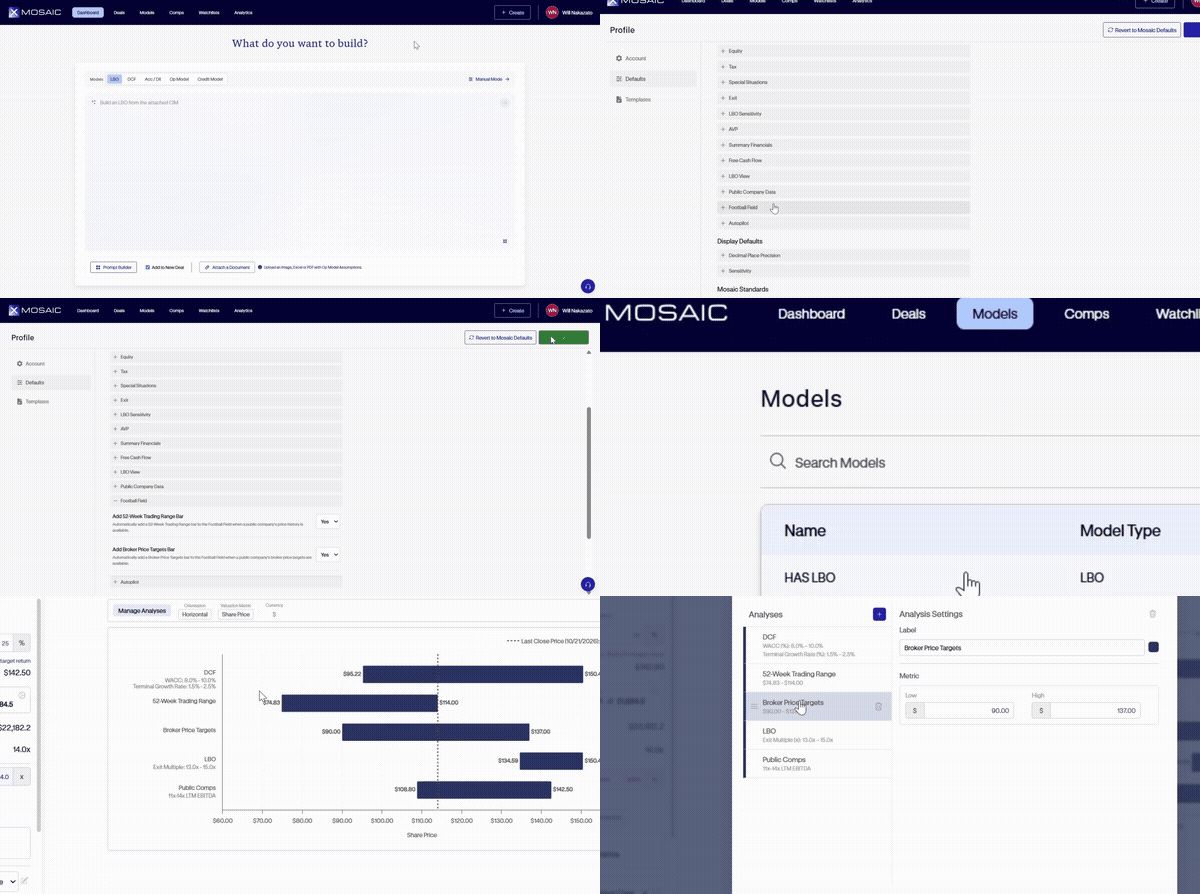
Transaction assumptions can be specified directly within the prompt, giving teams control over key modeling inputs from the outset. For assumptions not explicitly provided, Mosaic AI can reference the user's saved profile defaults, including entry assumptions, debt pricing, and custom output formats. This allows teams to maintain consistency across analyses without repeatedly entering the same inputs.
New Prompt Builder
For those unsure where to begin, Mosaic's new Prompt Builder provides a structured approach to creating prompts. Select from individual assumption blocks to define the desired model parameters and build a more detailed prompt without having to write everything from scratch.
To automatically organize the new model into a deal folder, simply select "Add to New Deal" when initiating the build.
2 - Mosaic's Expanded AI Agent
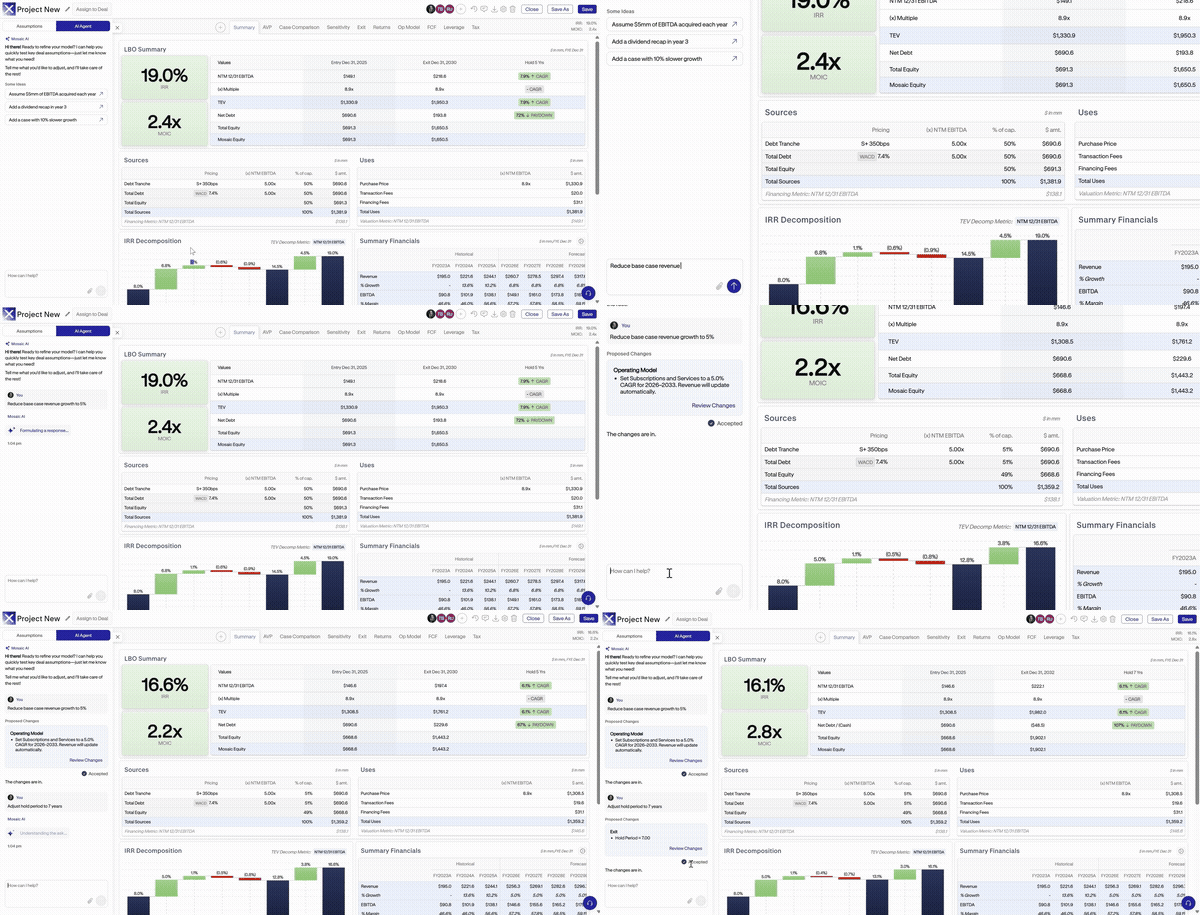
Mosaic's AI agent has been expanded to support a broader range of modeling tasks, both within the manual model-building wizard and after a model has been created. Accessible through a collapsible toolbar on the left-hand side of the screen, the agent allows teams to modify existing models, incorporate additional source materials, run follow-up analyses, and share models with colleagues using natural language instructions.
Suggested Prompts and Modeling Guidance
The expanded agent also includes shortcuts to commonly requested actions, making it easier to access relevant functionality without writing a prompt from scratch. Examples include "Add the rows from this image" and "Set up a SaaS build."
Beyond executing modeling tasks, Mosaic AI can also serve as an in-platform guide. Teams can ask how to build, configure, or edit specific components of a Mosaic model, and the agent will provide detailed, step-by-step instructions.
Continued Access to Key Value Drivers Panel
The existing Key Value Menu remains available within completed models, ensuring that model assumptions are still easily accessible and editable. Simply select "Assumptions" at the top of the collapsible toolbar to switch between the AI agent and the traditional assumptions view.
Public Comps are Now Live
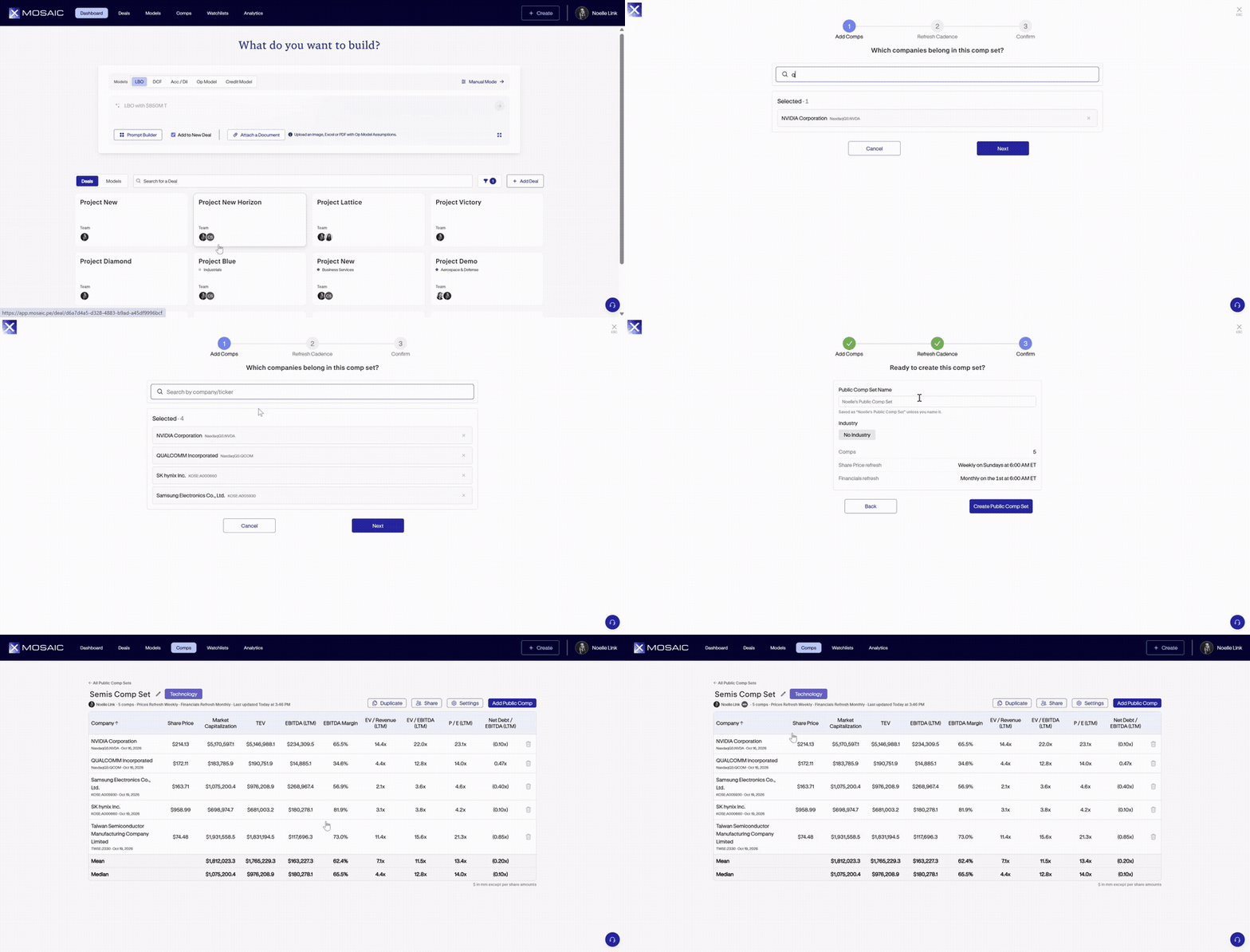
Create and manage comparable sets of public companies and use them for valuation analysis in football fields, deriving exit multiples in DCF/LBO, and calculating beta in the DCF. Comp sets can be refreshed with one click or configured to automatically update on a recurring cadence.
Creating a Public Comp Set
To create a new public comp set, navigate to the new "Comps" tab at the top of the homepage. Then, to build a comp set, click "Create Public Comp Set" in the top right corner. Search by company or ticker to select the relevant companies for a given set. Next, choose how often the comp set will refresh the share price and the financials for each selected company. Note that each refresh setting can be turned off to keep the view set at a given moment in time. Finally, name the comp set and assign an industry tag if relevant, then hit create to see the finished result. Once a comp set is complete, easily share, edit, or duplicate as needed.
All completed comp sets are accessible within the Comps tab library, which provides an overview of each set's median valuation metrics, including EV / Revenue (LTM), EV / EBITDA (LTM), and P/E (LTM). The library also displays the number of companies included, industry classification, and most recent refresh date. Comp sets can be searched and filtered directly from this view.
Linking Comp Sets to Model Assumptions
Public comp sets can be linked directly to exit multiple assumptions within the model wizard or an existing model. To do so, navigate to the Exit menu, select "Link to Source Value," and choose "Public Comp Set" to access available comp sets. This allows teams to reference comparable company valuations directly within their models, rather than manually entering exit multiple assumptions.
Broker Price TargetsAvailable in Football Field Charts for Public Companies
Mosaicnow supports broker price targets within Football Field charts for publiccompanies, allowing users to incorporate analyst price expectations alongsidetraditional valuation methodologies. By bringing broker targets together withLBO, DCF, and comparable company valuations in a single view, teams can moreeasily compare market expectations against their own valuation analyses.
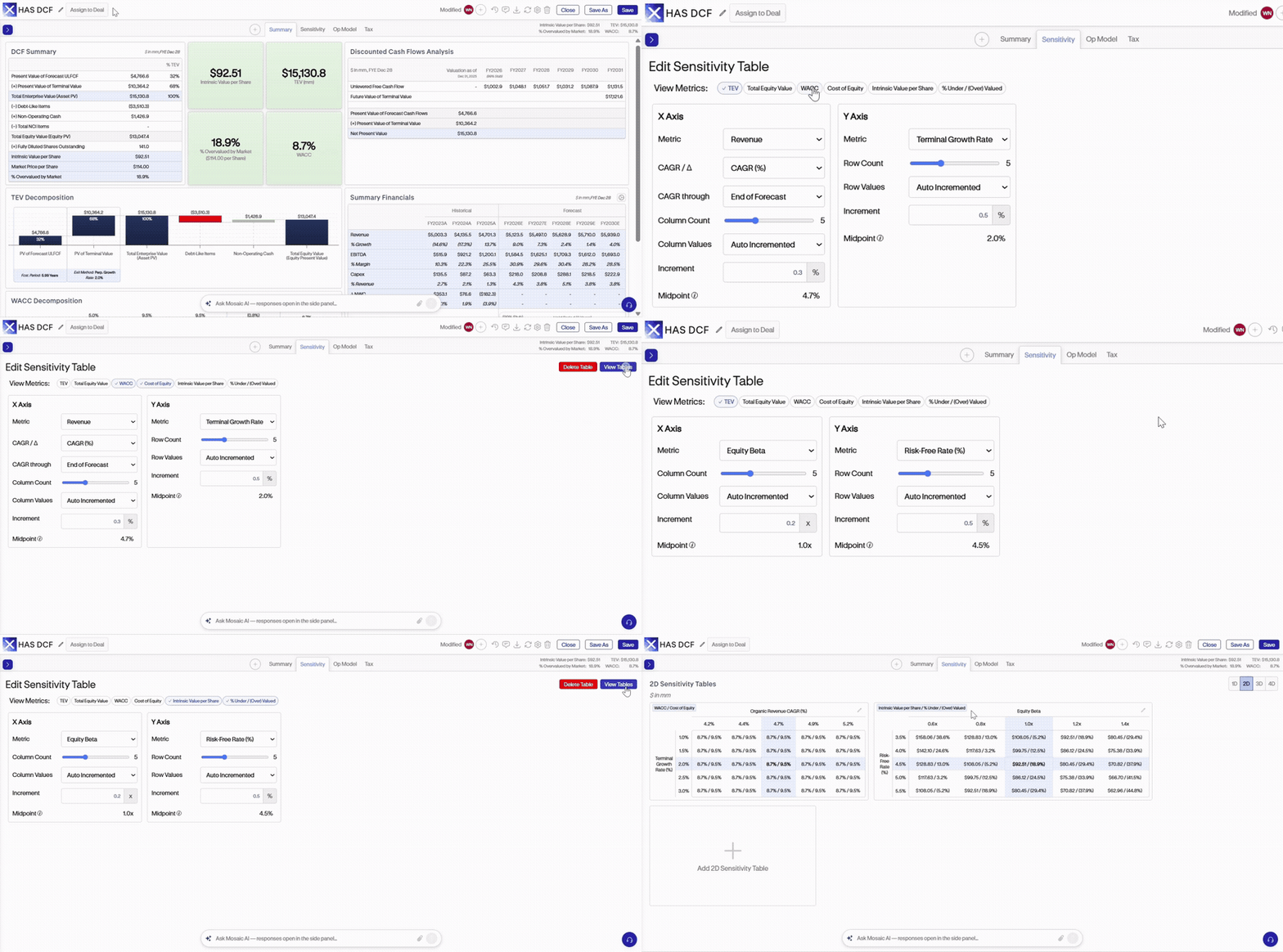
New in Sensitivity Tables:WACC and Cost of Equity Output Metrics for DCF Sensitivities and IntrinsicPrice per Share and % Undervalued
Mosaiccontinues to expand sensitivity table functionality with additional outputmetrics for DCF models, including WACC, cost of equity, intrinsic price pershare, and percentage undervalued. These new metrics provide greaterflexibility to evaluate how changes in key assumptions impact discount rates,implied valuations, and potential upside or downside. Teams can now analyze abroader range of valuation drivers directly within sensitivity tables, makingit easier to assess the impact of different scenarios.
Export Dynamic SensitivityTables in LBO and Acc/Dil Models
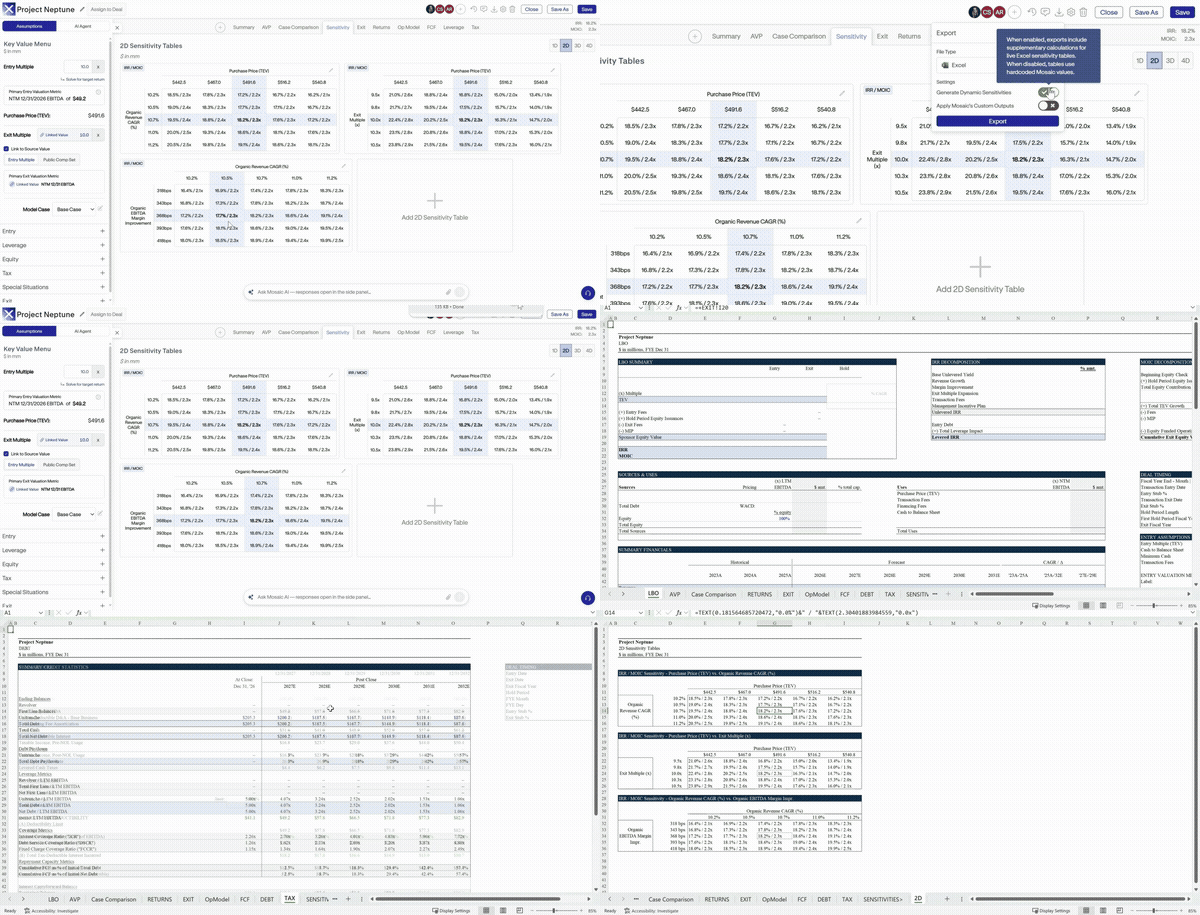
Mosaicnow supports exporting dynamic sensitivity tables from LBO andAccretion/Dilution models directly into Excel. These tables retain theirdynamic functionality after export, allowing teams to recalculate sensitivityoutputs as underlying model assumptions change. This provides greaterflexibility when sharing analyses, reviewing different scenarios, andincorporating Mosaic-generated sensitivities into existing Excel-basedworkflows.
Deterministic
Models, Enhanced by AI
Learn more about how AI is selectively integrated into Mosaic’s deterministic modeling platform
Built for Enterprise Trust
Protecting your data is core to how Mosaic is built. Mosaic is enterprise-ready and secure by design.
By the Numbers
Experience the platform live
Reach out to learn how finance professionals worldwide are leveraging Mosaic to work more efficiently.