Platform Updates: March 2026
Mosaic Tailor-Made Outputs
Over the last month, Mosaic rolled out custom-formatted Excel outputs for three of the top ten private equity firms. This capability allows Mosaic to map directly to a firm’s IC materials across Excel, PowerPoint, and PDF, reducing or eliminating the need for reformatting outside the platform. Labels, structure, tab layout, colors, and fonts can all be customized to match firm-specific preferences.
Contact your Mosaic account manager to learn more about custom outputs and how Mosaic can partner with your firm!
A Redesigned Operating Model Experience
1 – Edit operating models with Mosaic’s new toolbar. Mosaic’s operating model now features a redesigned interface that makes it easier to add custom rows or templates under any line item. Users can also adjust the model period, last fiscal period, currency, units, and fiscal year-end directly from the toolbar. New templates can be saved from the “Save as Template” dropdown, whether for the full model or for an individual build, like revenue.

2 – Access a new model settings menu from the toolbar. A new Operating Model Settings menu in the top-right corner of the toolbar gives users quick access to key model settings. From this menu, users can rename models, change model periods, adjust NWC format, and update the last fiscal period, currency, and units.

3 – Expanded shortcut menu. Built for finance professionals, Mosaic’s shortcut menu is now more flexible, with shortcuts for navigation, operating model actions, row insertion, templates, drivers, and model settings.

4 – Highlighted cells for model inputs. When building or editing an operating model, input rows are now highlighted in yellow. Hardcoded assumptions also appear in blue font, making user input and model review easier.
5 – Suggested formulas in the operating model. When users add custom operating model line items, Mosaic now suggests relevant formulas in the formula bar when no formula has been selected. For example, if two new rows are labeled price and volume, Mosaic will suggest price × volume.

6 – Edit Mode and Read-Only Mode. In the “Op Model” tab, models are now in Read-Only mode by default once the initial build is complete. To make changes, users can click “Edit” in the top-right corner.
7 – New Manage Case Menu in Edit Mode. After entering “Edit Mode” in the “Op Model” tab, users can access a new case manager by clicking the current case name in the top-left corner of the toolbar. Under Case Settings, users can toggle the model period, NWC format, fiscal period, currency, and more.
To create a new case, click the plus icon either on the left side of the case menu or directly in the toolbar next to the case name. Users can then name the case and choose a source case to copy from.

8 – Growth rates and margins now pull forward in new forecast periods. If the final forecast year in a model is hardcoded, Mosaic will now carry forward the growth rates and margins when a new year is added to the forecast, rather than carrying forward the hardcoded values themselves.
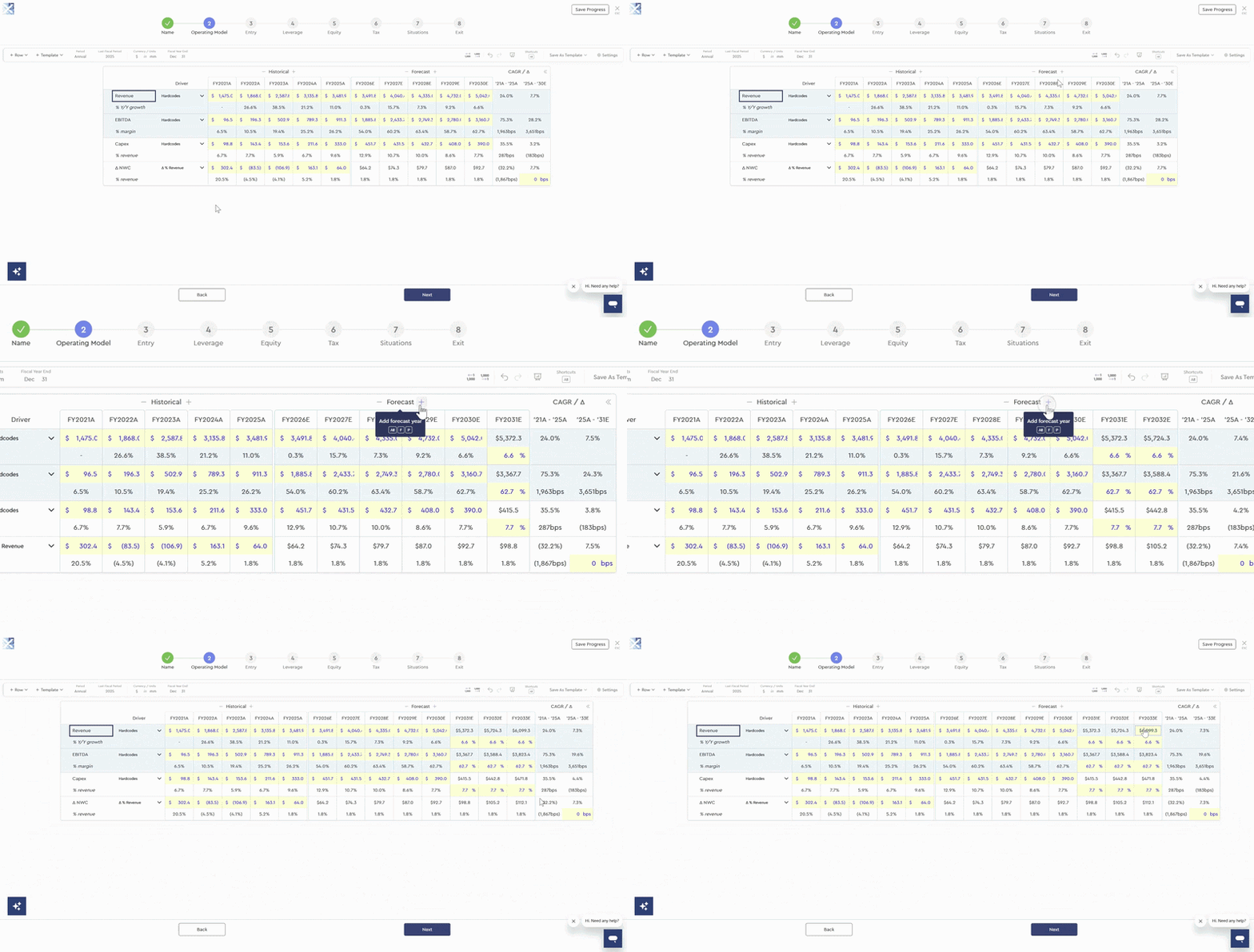
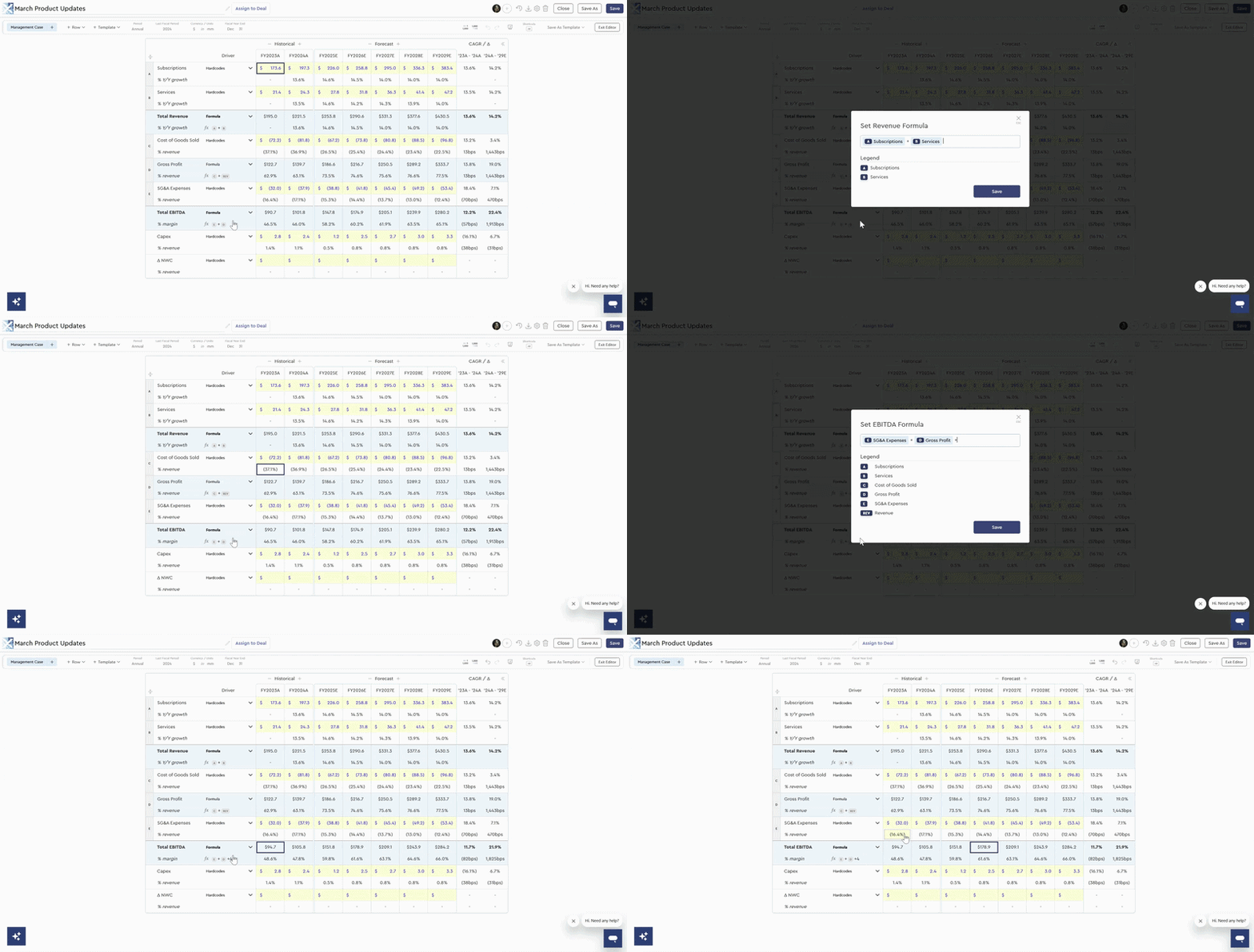
9 – Hit F2 on any formula row for access to the formula menu. Users can now quickly edit any formula row in the operating model by pressing F2.
10 – Hardcode data in formula driver rows. When creating formulas in Mosaic’s operating model, users can now hardcode values directly in the formula bar, allowing for more versatile formula structures.
Autopilot Now Supports DCF
Mosaic’s agentic workflow, Autopilot, can now build DCFs based on any deal prompt. Previously limited to LBOs, Autopilot helps investors get an early read on a sell-side model or a CIM without needing to navigate through Mosaic’s model wizard.
To build a DCF with Mosaic Autopilot, email model@mosaic.pe with the prompt and supporting materials required to build the model (e.g., “CIM attached – what is the TEV under the Management Case at a 10% WACC?”). Within about 5 minutes, you will receive an email with a link to the Mosaic model, the PDF output, and a summary of the deal.
.gif)
Case Comparison Exports to Excel
The Case Comparison output tab can now be exported to Excel, including any custom line items selected in the Mosaic platform—making it more seamless and accessible to compare cases in a spreadsheet format.

Custom Operating Segment Sensitivity Tables
Mosaic’s sensitivity tables are now more flexible, with the ability to sensitize any individual line item from the operating build. This means users can flex total revenue and total EBITDA along with segment-specific line items such as subscription revenue, services revenue, or individual operating expenses.
To choose a line item, navigate to the “Sensitivity” tab in a completed model, click “Add Sensitivity Table”, and use the X- and Y-axis dropdown menus to select the desired item.

Sensitize Base Rates and Dividend Recap Leverage
Mosaic now supports sensitivity analysis for base rates and dividend recap leverage within the “Sensitivity” tab. To sensitize base rates, create a new sensitivity table and use the X- or Y-axis dropdown to select “Base Rates”, then choose your desired increment. Note: this option is only available when leverage is priced off a base rate (e.g., SOFR, SONIA, or EURIBOR).
Similarly, when the dividend recap special situation is enabled, you can select “Recap Max Leverage Multiple” from the same dropdown to run sensitivities on recap leverage. With this update, investors can stress test a broader range of debt assumptions, enabling a deeper understanding of how different financing structures impact returns directly within Mosaic.

Implied Growth Rate and Multiples in the DCF
In the DCF model, the implied growth rate and implied multiple now appear as memo lines below the selected terminal value methodology, both in the wizard and in the terminal value section of the Key Value Drivers panel. This makes it easier to compare terminal value methodologies side by side.

Expanded AVP for Bid Price per Share
Firms using Mosaic’s Cap IQ integration can now run an analysis at various prices using “Bid Price per Share” as the primary driver. In completed models that use Share Price as the entry methodology, Mosaic will automatically factor in fully diluted shares outstanding, market price per share, and bid premium.

Additional Defaults for Tax Shields and Sensitivity Metrics
New functionality in profile defaults now lets users customize tax shields and the metrics shown in sensitivity tables across completed models. To update these defaults, navigate to the profile defaults section of the platform by clicking the dropdown next to the user name on the homepage and selecting “Defaults”.
Under the “Tax” dropdown, tax shield functionality is now split between “Corporate Tax Shield” and “Flow-Through Tax Shield”. For each, users can customize the amortization period, discount rate, and whether the tax shield is valued at exit.
Under the “LBO Sensitivity” dropdown, users can adjust display metrics for Mosaic’s Equity and Credit Investor views, making it easier to surface the metrics most relevant to their firm.

Deterministic
Models, Enhanced by AI
Learn more about how AI is selectively integrated into Mosaic’s deterministic modeling platform
Built for Enterprise Trust
Protecting your data is core to how Mosaic is built. Mosaic is enterprise-ready and secure by design.
By the Numbers
Experience the platform live
Reach out to learn how finance professionals worldwide are leveraging Mosaic to work more efficiently.
.avif)